

As a media contacts database and media intelligence provider, Medianet sits at the centre of press release distribution in Australia. Between January and August 2026, we distributed 8,496 releases for our clients, and 63% of them earned at least one pickup from an earned media outlet (not ...
Find events most relevant to you
There are 2 methods you can use to quickly identify events that are relevant to you or that you may be interested in.

1. Filter by keyword or category
Simply type in a keyword to find all events that use that keyword. This will search the entire calendar and provide a list of results.

Additionally you can also filter by including or excluding categories. simply click on the Filters button and select or unselect the categories you want to include.
2. Use our AI Event Finder
You can perform more advanced, semantic searches by using our powerful AI Event Finder. Use natural language to explore themes, topics and more. Please note that some searches may take longer as our AI scans the calendar for results.e.g. "What events are happening around disability awareness?"
Brainstorm ideas for newsjacking
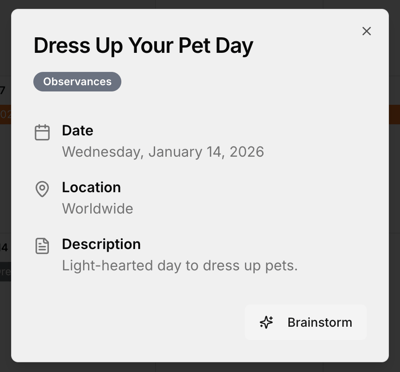
Leveraging media events and awareness days is a great way to associate your brand/organisation with a cause or to gain extra media attention. We've made this even easier by introducing an AI-powered brainstorming tool for media events.
Brainstorm
When you click on an event in the calendar the event details will appear. Along with the event details, you can also find our Brainstorm tool. Simply click on the Brainstorm button and our AI-powered tool will generate a list of ideas to leverage the event for media attention.
Please note that these are generic ideas not tailored to specific organisations or industries.
Viewing options to reduce clutter

In order to reduce clutter and make the calendar easier for you to use, we've separated longer events from the main calendar and introduced a list view.
Awareness months and long events
Awareness months (such as Dry July) and events that are longer than 1 week have been moved to a panel to the right of the calendar. This allows you to quickly identify larger opportunities to leverage and include in your media strategy.
Switch between calendar and list view
You can easily toggle between a calendar view and a list view by toggling the display at the top left corner of the calendar. The list view allows you to see all of the event details without having to open each event individually.
Latest Posts
5 MIN
27 September, 2026
.png "63% of press releases sent via Medianet earned media pickup in 2026.")
Latest Posts
3 MIN
22 September, 2026
.png "Communication Intelligence Briefing:Your Entire Media Landscape in One Place.")
Data without context is just noise. Most PR and comms teams are drowning in data with no intelligence layer to explain why something happened and what to do next. At Medianet, we built the Communication Intelligence Briefing (CIB) to answer one question directly: so what? Delivered weekly inside ...
 Top
Top